
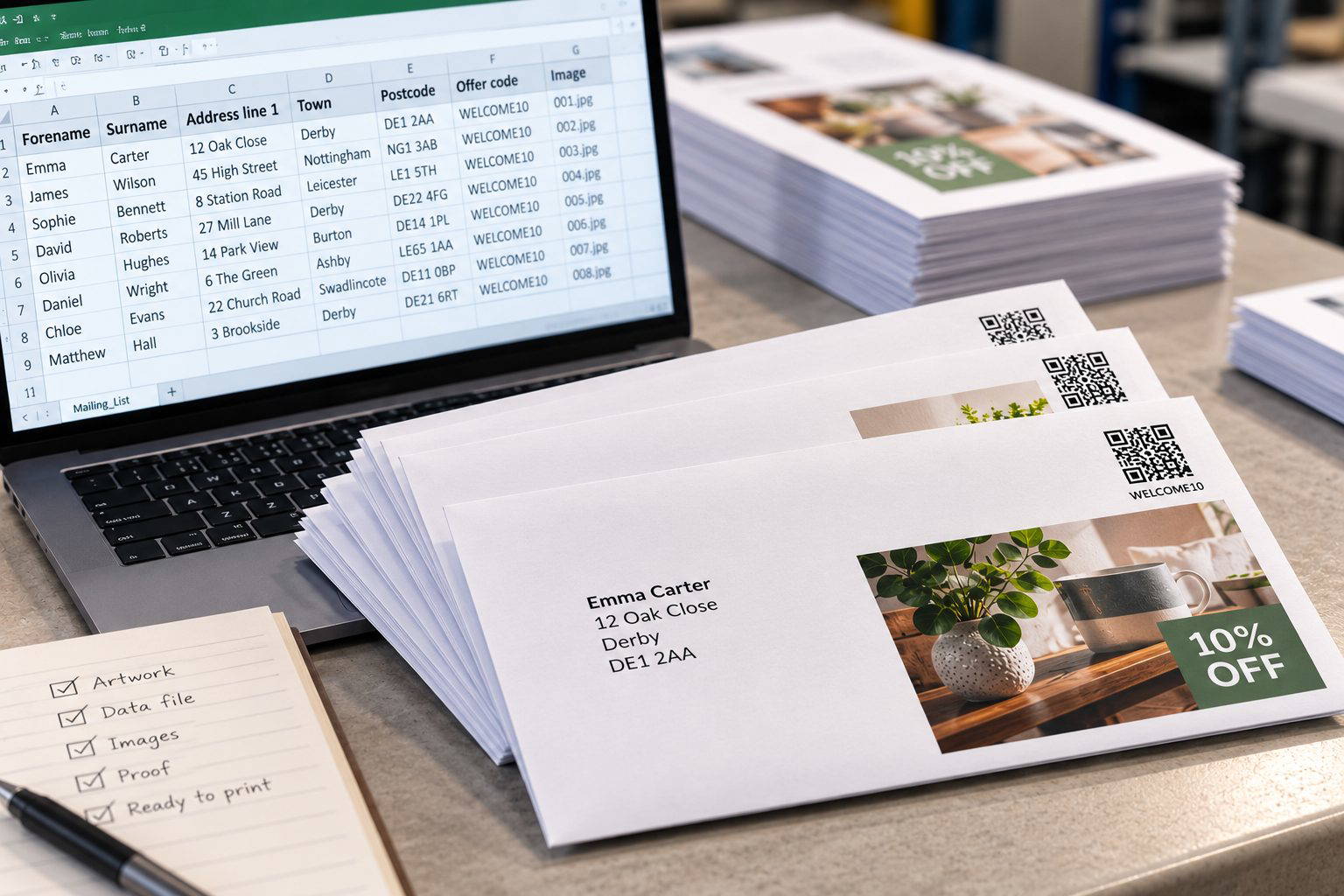
If you’re organising a personalised mailing, invitation or campaign where each piece changes slightly, the print itself is usually the easy part. The bit that causes problems is normally the data.
Names, addresses, offer codes, barcodes and images all need to match up properly before anything gets near the press. If the files are prepared cleanly at the start, the job is much easier to proof and far less likely to hit problems later.
Start by separating the fixed artwork from the personalised parts
For most variable-data jobs, we’d normally want the main design supplied separately from the information that changes.
The fixed artwork might include things like your logo, background graphics, legal wording and anything else that stays the same on every copy. The variable information then comes from a separate data file.
That could be as simple as a name and address, or it could include different offer codes, membership numbers, barcodes, QR codes or even different images for different recipients.
The more complicated the variable information becomes, the more important it is to agree how the job will work before the artwork is finalised. A straightforward name-and-address mailing is very different from a campaign with multiple layouts, conditional content and hundreds of individual images.
Keep the data clean
This sounds obvious, but it is one of the biggest things that can save time.
We’d much rather receive a simple spreadsheet with clear column headings than a file that needs interpreting before we can use it.
For an address mailing, for example, it makes sense to keep the important parts in separate columns where possible, such as:
- Forename
- Surname
- Address line 1
- Address line 2
- Town or city
- Postcode
That gives us much more control over how the address is merged into the artwork and makes it easier to spot missing or inconsistent information.
We’d also recommend removing obviously blank records, duplicate rows and unnecessary columns before sending the file over. If the job includes unique codes or barcodes, those need checking particularly carefully because a duplicate can create a much bigger problem than a spelling mistake.
Variable images need a bit more planning
Personalised images can work really well, but this is where the job can become more involved.
If every recipient is receiving a different image, the filenames need to match the data clearly and the images themselves should be prepared consistently. If one image is landscape, another is portrait and another is a completely different proportion, the layout may not behave the way you expect.
We’d normally recommend keeping the image dimensions, orientation and crop as consistent as possible. If an image is particularly important, it is also worth checking how it will look on the stock you have chosen.
For example, a photograph printed onto an uncoated sheet will not have quite the same punch as the same image on a smooth coated stock. That does not make uncoated wrong, but it does mean the paper choice should be part of the decision rather than an afterthought.
Barcodes, QR codes and unique numbers need checking properly
If the variable information includes barcodes, QR codes, voucher numbers or membership references, we would treat those more carefully than ordinary text.
The main thing is making sure every record is unique where it needs to be and that the finished code remains large and clear enough to scan reliably.
If you are supplying the codes yourself, it is worth checking the source data before the job is merged. We can check the layout and print quality, but we cannot know that a duplicated voucher number is wrong unless the data itself tells us.
A proof is more useful than a perfect spreadsheet
You do not need to make the data file look pretty. What matters is that it is consistent and understandable.
Before a variable job goes into production, we’d much rather spend time checking the merged result than styling the spreadsheet it came from.
A useful proof should show enough different records to make sure names fit properly, addresses wrap where expected, longer information does not run into other parts of the design and any conditional elements are behaving correctly.
This is especially important when some records are much longer than others. A layout that looks perfect with “Sam Lee” may behave very differently with a long company name and a four-line address.
What we’d send us if we were setting the job up
For most personalised print jobs, we’d suggest keeping it simple:
- one clean version of the main artwork;
- one clearly labelled spreadsheet containing the variable information;
- separately supplied images where the artwork changes by recipient;
- clear instructions explaining what changes and what stays fixed;
- and, where possible, examples of any unusual records or layouts we need to look out for.
If the campaign is more complicated than that, we’d rather look at it before everything is finalised. It is usually much easier to adjust the artwork or data structure at the start than to fix it once the merge has already been built.
Planning a personalised print job?
Send us the artwork and a sample of the data and we can tell you the simplest way to set it up before you commit to the full run. Get in touch with us.